Local developer stack
Audience: Hokeka engineers building or debugging Console, Control Plane, or Edge — not PSP production installs.
Purpose: Run a practical full stack on a laptop without contradicting production compose paths.
For production Hostinger deployment use 03 — Control Plane and 02 — Console.
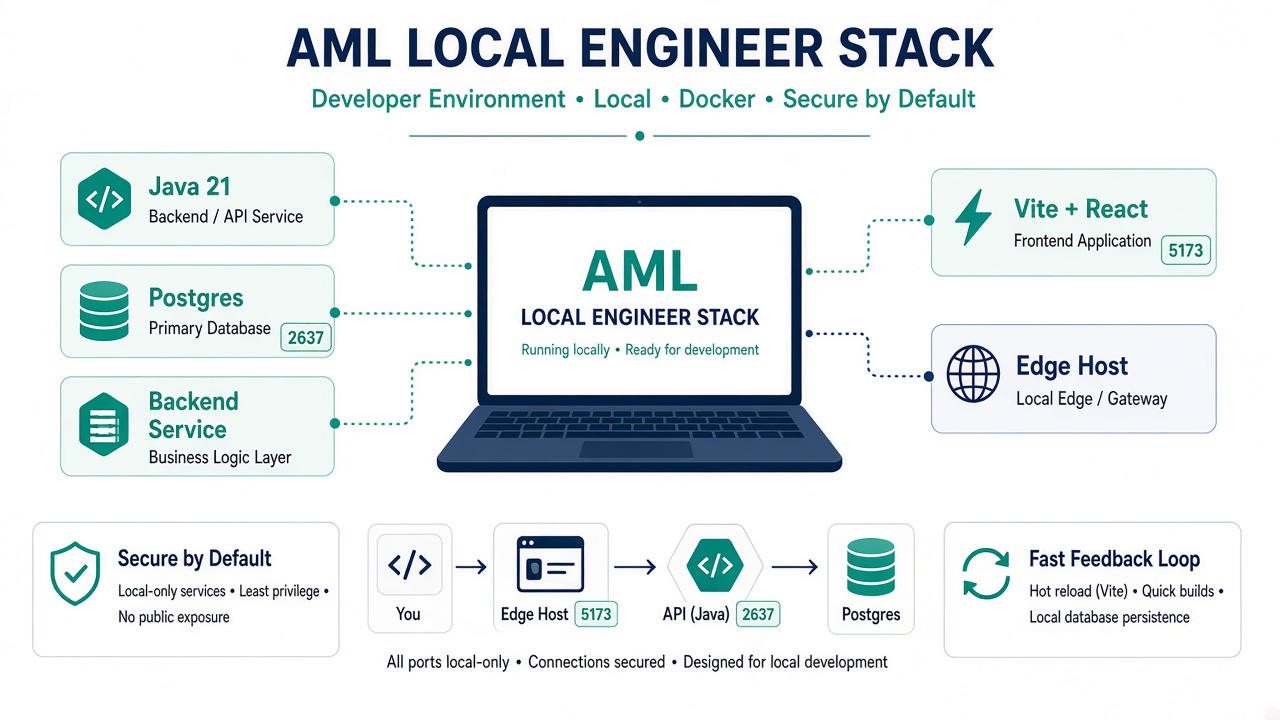
Figure 1 — The laptop stack. It mirrors the production compose topology, so a local change behaves the same way once deployed — but it is not a production install and must not be exposed.
What you are running locally
| Component | Path | Default port |
|---|---|---|
| Control Plane | BACKEND/ | 2637 |
| Console | FRONTEND/ | 5173 (Vite dev) |
| aml-microservice | aml-microservice/ | 8091 (when needed) |
| Postgres (+ optional Kafka, etc.) | BACKEND/docker-compose.yml or infra/ | 5432 internal |
Edge Node (edge-host/) is optional for edge-specific work — see 01 — Client Edge Node or run edge from Maven with native core.
Prerequisites
| Tool | Version | Notes |
|---|---|---|
| Java JDK | 21 | BACKEND/pom.xml <java.version>21</java.version> |
| Maven | 3.9+ | Build BACKEND / edge-host |
| Node.js | 20+ | Matches FRONTEND/Dockerfile |
| Docker + Compose v2 | current | Postgres and optional infra |
| Rust toolchain | stable | Only if building edge-engine / JNI locally |
Automated bootstrap (fresh laptop):
sudo ./scripts/install/hokeka-install.sh --role console --yes
Step 1 — Infrastructure (Postgres minimum)
From BACKEND/:
cd BACKEND
docker compose up -d postgres
Wait for Postgres:
docker exec fraud-detector-postgres pg_isready -U fraud_detector -d fraud_detector
Optional fuller infra (Kafka, Redis, Neo4j, Aerospike):
# Repo root
docker compose -f infra/docker-compose.infrastructure.yml up -d
Or use docker-compose.test.yml for an integrated test stack — not for production patterns.
Do not use
architecture-v2/compose for local prod-like stacks — archival only.
Step 2 — Control Plane (BACKEND)
cd BACKEND
mvn clean package -DskipTests   # or mvn test for full verify
mvn spring-boot:run -Dspring-boot.run.profiles=dev
Or use the helper script:
cd BACKEND
./start-dev.sh
Dev profile endpoints:
- API: http://localhost:2637/api/v1
- Swagger: http://localhost:2637/api/v1/swagger-ui.html
- Health: http://localhost:2637/actuator/health
Flyway (when testing migrations):
cd BACKEND
mvn flyway:migrate
Dev profile uses local credentials from application-dev.properties — never use testenv against shared databases (ddl-auto=create-drop).
Step 3 — aml-microservice (when testing sanctions path)
cd aml-microservice
mvn spring-boot:run
Requires Aerospike reachable per src/main/resources/application.yml. For minimal local work, many flows run with AML_MICROSERVICE_ENABLED=false in dev — check application-dev.properties.
Production topology always routes sanctions via aml-ms-prod (03-control-plane.md).
Step 4 — Console (FRONTEND)
cd FRONTEND
npm install
npm run dev
- Console: http://localhost:5173
- Vite proxies
/api/v1→http://localhost:2637(override withVITE_PROXY_TARGET)
VITE_PROXY_TARGET=http://localhost:2637 npm run dev
Quality gates:
npm run typecheck
npm run lint          # zero warnings
npm run build         # tsc + vite production build
See 02 — Console for env vars and production contrast.
Step 5 — Optional Edge Node (local)
For edge/JNI development:
cargo build --release -p edge-jni
mvn -pl edge-host spring-boot:run -Dspring-boot.run.profiles=dev
Native core must be on java.library.path. Full client-like install: edge-host/deploy/install.sh against a dev control plane — use test enrollment from Console.
Full stack quick reference
Terminal 1 — infra:
cd BACKEND && docker compose up -d postgres
Terminal 2 — Control Plane:
cd BACKEND && mvn spring-boot:run -Dspring-boot.run.profiles=dev
Terminal 3 — Console:
cd FRONTEND && npm run dev
Verify: log in at http://localhost:5173, open Alerts or Edge Nodes.
Docker-only alternative (test stack)
For integration testing without manual Maven:
docker compose -f docker-compose.test.yml up --build
Uses test hostnames and CORS entries — not a substitute for Hostinger production config.
Profiles — do not mix
| Profile | Use | Warning |
|---|---|---|
dev | Local BACKEND | Safe default for engineers |
production | Hostinger compose | Real secrets, validate DDL |
testenv | Automated tests only | create-drop — never expose externally |
What local stack is not
| Do not | Instead |
|---|---|
Use lowercase frontend/ | FRONTEND/ only |
Run architecture-v2/ engines for product work | Root docker-compose.prod.yml topology |
| Install on-prem lease BACKEND | Edge Node product path |
| Point dev Console at prod API with prod credentials | Use test environment or local BACKEND |
Related
- Installation process map
- 02 — Console
- 03 — Control Plane
AGENTS.md— common commandsdocs/INSTALL.md§3 — artifact build reference