Control Plane install (Hokeka ops)
Audience: Hokeka platform operators.
Product term: Control Plane = BACKEND/ + aml-microservice/ + Postgres, Kafka, Redis, Neo4j, Aerospike (cloud sanctions cache), ClamAV, etc. (docs/SYSTEM-GLOSSARY.md).
This is not: Console-only dev setup (02), Edge Node (01), or packages CDN (04).
Canonical method: Docker Compose — docker-compose.prod.yml at repo root. Do not hand-assemble services.
Hosting: Hostinger VPS (not AWS). Host nginx terminates TLS; application containers bind 127.0.0.1 only.
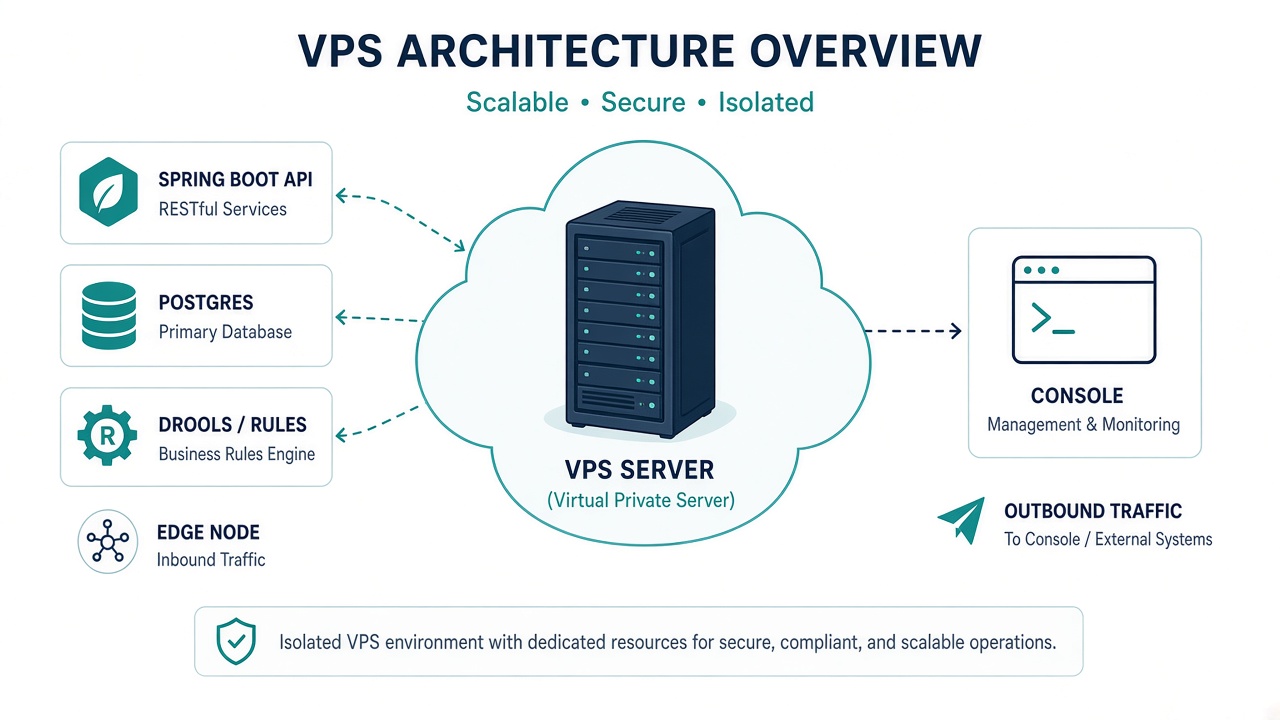
Figure 1 — The Control Plane on the Hokeka VPS. It ingests sealed decision records, runs alerts, cases and regulatory filing, and hosts the AI decision layer. It never stores transaction data.
Prerequisites checklist
- Linux VPS with Docker Engine + Compose v2
- DNS:
api.hokeka.com,aml.hokeka.com(and test equivalents if used) - Ports 80/443 open publicly; nothing else published from app containers
- SSH access for deployment user
- Real secrets prepared before first
docker compose up(see below)
Step 1 — Bootstrap server
Recommended (on the VPS, idempotent):
cd /opt/aml-fraud-detector   # or your git clone
sudo ./scripts/install/hokeka-install.sh --role control-plane --yes
This installs Docker + Compose v2, Node LTS, git, generates /opt/aml-fraud-detector/.env with strong secrets (values are never printed), starts docker-compose.prod.yml, enables hokeka-control-plane.service, and checks http://127.0.0.1:2637/actuator/health. Details: 07 — First-run bootstrap.
Optional (from your laptop — rsync only):
./deploy-to-hostinger.sh <VPS_IP> <SSH_USER> <SSH_KEY_PATH>
This installs Docker, rsyncs the repo to /opt/aml-fraud-detector, and may create .env.prod.
STOP:
deploy-to-hostinger.shwrites placeholderCHANGE_ME_*secrets and variable names (DB_HOST,DB_USER, …) thatdocker-compose.prod.ymldoes not read. Treat the script as Docker bootstrap only. Write the real.envper Step 2 before the first productionup.
Step 2 — Secrets (/opt/aml-fraud-detector/.env)
Compose refuses to render if required ${VAR:?} values are missing.
Required (compose fails without these)
DATABASE_USERNAME=<db user>
DATABASE_PASSWORD=<strong unique password>
AUDIT_HMAC_KEY=<32-byte key>
PII_LOOKUP_HMAC_KEY=<32-byte key>
NEO4J_PASSWORD=<strong unique password>
JWT_SECRET=<256-bit secret>
ENCRYPTION_KEY=<base64 of 32 random bytes: openssl rand -base64 32>  # production boot fails if missing/invalid
AML_MS_INTERNAL_KEY=<shared secret: backend → aml-ms>
AUTH_PASSWORD_RESET_PEPPER=<32-byte key>   # pepper for password-reset token hashes
SEED_ADMIN_PASSWORD=<strong unique password for the bootstrap 'admin' login>
CONSOLE_BASE_URL=https://<console host>    # invite/password-reset email links (/accept-invite, /password-reset/confirm); website-prod build maps this to VITE_CONSOLE_URL for Navbar Client login
Also set
AML_INTERNAL_API_KEY=<same value as AML_MS_INTERNAL_KEY>
# When building website/ outside compose, set the same origin the Control Plane uses:
# VITE_CONSOLE_URL=https://<console host>   # must match CONSOLE_BASE_URL; Docker/compose pass it as a build arg
Edge channel keys (required; generated by the installer)
The production profile refuses to start without these (the Control Plane would otherwise
generate ephemeral keys, and every restart would break every enrolled Edge Node). Compose refuses
to render without them too. hokeka-install.sh --role control-plane (scripts/install/lib/control-plane-env.sh)
generates each one only when it is absent and never prints a value. Values are one-line base64 DER.
| Variable | What it is |
|---|---|
EDGE_BUNDLE_SIGNING_KEY / EDGE_BUNDLE_SIGNING_PUBLIC_KEY | Ed25519 PKCS#8 / SPKI: signs every rule bundle and Edge config; Edges pin the public key at enrolment |
EDGE_METRICS_INGEST_KEY / EDGE_METRICS_INGEST_PUBLIC_KEY | X25519 PKCS#8 / SPKI: Edges seal metrics and decision records to it |
EDGE_TUNNEL_CURSOR_SECRET | HMAC secret of Edge Tunnel composite cursors; identical on every instance |
EDGE_CA_KEY / EDGE_CA_CERT | Hokeka Edge CA (EC P-256, 10 years): signs the CSR each Edge sends at enrolment and renewal |
EDGE_PROXY_SHARED_SECRET | nginx adds it as X-Hokeka-Proxy-Secret on edge.hokeka.com; forwarded client-certificate headers are trusted only with it |
EDGE_CA_CRL_HOST_DIR | Host directory (default /etc/nginx/hokeka/crl, owned by uid 1001) where the backend writes the CRL nginx enforces |
Back these up with the rest of .env. Rotating the signing or ingest key, or the CA, means every
Edge Node must re-enrol.
Manual generation, if you are not using the installer (OpenSSL 1.1.1+):
umask 077; t=$(mktemp -d)
openssl genpkey -algorithm ED25519 -out $t/ed.pem
echo "EDGE_BUNDLE_SIGNING_KEY=$(openssl pkcs8 -topk8 -nocrypt -in $t/ed.pem -outform DER | base64 -w0)" >> .env
echo "EDGE_BUNDLE_SIGNING_PUBLIC_KEY=$(openssl pkey -in $t/ed.pem -pubout -outform DER | base64 -w0)" >> .env
openssl genpkey -algorithm X25519 -out $t/x.pem
echo "EDGE_METRICS_INGEST_KEY=$(openssl pkcs8 -topk8 -nocrypt -in $t/x.pem -outform DER | base64 -w0)" >> .env
echo "EDGE_METRICS_INGEST_PUBLIC_KEY=$(openssl pkey -in $t/x.pem -pubout -outform DER | base64 -w0)" >> .env
echo "EDGE_TUNNEL_CURSOR_SECRET=$(openssl rand -base64 48 | tr -d '\n')" >> .env
echo "EDGE_PROXY_SHARED_SECRET=$(openssl rand -hex 32)" >> .env
openssl genpkey -algorithm EC -pkeyopt ec_paramgen_curve:P-256 -out $t/ca.key
openssl req -x509 -new -key $t/ca.key -sha256 -days 3650 -subj "/O=Hokeka Edge/CN=Hokeka Edge CA" \
  -addext "basicConstraints=critical,CA:TRUE,pathlen:0" -addext "keyUsage=critical,keyCertSign,cRLSign" \
  -addext "subjectKeyIdentifier=hash" -out $t/ca.crt
echo "EDGE_CA_KEY=$(openssl pkcs8 -topk8 -nocrypt -in $t/ca.key -outform DER | base64 -w0)" >> .env
echo "EDGE_CA_CERT=$(openssl x509 -in $t/ca.crt -outform DER | base64 -w0)" >> .env
rm -rf $t
Bootstrap admin. On first boot the Control Plane creates exactly one login, admin, with
SEED_ADMIN_PASSWORD. It never resets an existing admin password. No demo accounts exist outside
the dev/test profiles: migration V253 and the boot-time DefaultCredentialGuard disable any
demo account (super.admin, velocity.admin, compliance, …) that still has the published default
password, and rotate admin to SEED_ADMIN_PASSWORD if it still has it. To use one of those
accounts, re-enable it in Console → Users and issue a password reset. The installer
(hokeka-install.sh) generates both new secrets; read the admin password from .env.
Mail (optional). MAIL_HOST, MAIL_PORT, MAIL_USERNAME, MAIL_PASSWORD, MAIL_FROM. With
MAIL_HOST empty the platform runs without outbound mail and the mail health indicator is off,
so it cannot pull /actuator/health DOWN.
Generate each secret independently: openssl rand -base64 32. Never reuse across variables.
AML microservice alias — one credential, two names:
cd /opt/aml-fraud-detector
umask 077
AML_KEY="$(openssl rand -base64 48)"
printf 'AML_MS_INTERNAL_KEY=%s\nAML_INTERNAL_API_KEY=%s\n' "$AML_KEY" "$AML_KEY" >> .env
unset AML_KEY
Defaults (override per environment)
CORS_ALLOWED_ORIGINS=https://aml.hokeka.com,https://testaml.hokeka.com
KAFKA_BOOTSTRAP_SERVERS=kafka-prod:29092

# Console session hardening — docker-compose.prod.yml passes these into backend-prod
# (safe defaults if unset). Keep SESSION_TIMEOUT equal to HOKEKA_SESSION_IDLE_TIMEOUT.
SESSION_COOKIE_SECURE=true
SESSION_COOKIE_HTTP_ONLY=true
SESSION_COOKIE_SAME_SITE=Strict
SESSION_TIMEOUT=15m
HOKEKA_SESSION_IDLE_TIMEOUT=15m
HOKEKA_SESSION_ABSOLUTE_LIFETIME=8h
HOKEKA_SESSION_WARNING_BEFORE_IDLE=60s
HOKEKA_SESSION_MAX_CONCURRENT=10
HOKEKA_SESSION_LOCKOUT_MAX_ATTEMPTS=5
HOKEKA_SESSION_LOCKOUT_DURATION=15m
CORS_ALLOWED_ORIGINS must include every Console origin (02-console-dashboard.md).
Session cookies must be Secure + HttpOnly + SameSite=Strict behind nginx TLS for aml.hokeka.com.
SessionHardeningProperties and EnvVarStartupValidator flag missing or insecure values at
startup (names only, never secrets). Per-PSP idle overrides and IP allowlists are managed in the
Console (Settings → Security / PSP configure → Security), not via these env vars.
Hokeka AI decision layer (Control Plane only)
Hokeka AI credentials and provider settings live only on the Control Plane host — never on Edge Nodes or in the Console bundle. Until AI is enabled on the server, the platform runs rules-only (no AI mutations). Provider names, model identifiers, and API keys are not published in this documentation.
HOKEKA_AI_SHADOW_MODE=true           # default log-only
HOKEKA_AI_PROMOTED=false             # both promoted + shadow off required to apply
HOKEKA_AI_DAILY_CALL_BUDGET_PER_PSP=0
Additional provider-specific settings are configured as server-side environment variables on the Control Plane only. Health/status (no key exposure): GET /api/v1/ai/status (authenticated). Platform Admins configure per-engine toggles in Console → Settings → Hokeka AI.
Optional rule-generator toggle (AI_RULE_GENERATOR_ENABLED) runs on the Control Plane when enabled.
Fixed inside compose (not from .env)
DATABASE_URL=jdbc:postgresql://postgres-prod:5432/fraud_detectorSPRING_PROFILES_ACTIVE=productionSERVER_PORT=2637
Session cookie/timeout variables above are passed into backend-prod from .env with
compose defaults (SESSION_COOKIE_SECURE=true, SESSION_TIMEOUT=15m, …). Do not rely on a
host-only override file for them.
- Internal hostnames:
aml-ms-prod,kafka-prod,redis-prod,neo4j-prod,clamav-prod
Full reference: docs/INSTALL.md §1.3.
Sanctions list sources and licence
SANCTIONS_DOWNLOAD_ENABLED is on in production, but nothing is fetched until a source is enabled.
OpenSanctions requires a data licence for any for-profit use, compliance screening included: set
SANCTIONS_OPENSANCTIONS_LICENSED=true only once you hold one. With no enabled source the Control Plane
still boots and logs the setting by name, edgeSanctionsList health is DEGRADED, Edge Nodes answer
HOLD SCREENING_NO_LIST, and first activation of a PSP answers 409 until a list is published. Full table:
contract §6.6.
Sanctions watchlist (first deploy)
The production profile refuses to start when it cannot confirm a loaded sanctions watchlist
(SanctionsDataStartupCheck): an empty list would make every screen return "no match". On a fresh
install the aml-microservice set is empty, so choose one of:
- Automatic (recommended, licence held): set
SANCTIONS_OPENSANCTIONS_LICENSED=true(and, if you use a licensed mirror,SANCTIONS_OPENSANCTIONS_URL). On first boot the check sees the empty list, runs the OpenSanctions download once synchronously, and continues when records are present. The full dataset takes several minutes;backend-prodreports healthy afterwards. The daily refresh then runs at 02:00 (sanctions.download.cron). - Pre-seeded: start
aml-ms-prodfirst and POST your watchlist tohttp://aml-ms-prod:8091/internal/v1/sanctions/ingest(headerX-Internal-Auth: $AML_MS_INTERNAL_KEY, body{"entities":[…]}), confirmGET /internal/v1/sanctions/countreturnscount > 0, then startbackend-prod.
Startup behaviour is deterministic: the check retries an unavailable count for
sanctions.startup.count-wait-seconds (default 60 s in production), then aborts if the count is
still unknown (sanctions.startup.fail-closed-on-unavailable, default true in production) or the list
is still empty (sanctions.startup.fail-closed-on-empty, default true). The count probe has its own
timeout, AML_MICROSERVICE_COUNT_TIMEOUT_MS (default 3000).
Step 3 — Bring up the stack
cd /opt/aml-fraud-detector
docker compose -f docker-compose.prod.yml up -d --build
docker compose -f docker-compose.prod.yml ps    # every service (healthy)
Startup order: backend-prod waits for postgres, aml-ms, clamav, kafka, redis, neo4j. ClamAV first boot may take ~120s for signature download — slow first up is normal.
Services included:
| Service | Role |
|---|---|
backend-prod | Control Plane API (:2637 loopback) |
frontend-prod | Console static SPA (:8088 loopback) — see 02 |
aml-ms-prod | Aerospike-backed sanctions lookups (internal :8091) |
postgres-prod, kafka-prod, redis-prod, neo4j-prod, aerospike-prod, clamav-prod | Data / pipeline |
website-prod | Marketing site (internal). Build arg VITE_CONSOLE_URL comes from CONSOLE_BASE_URL (default https://aml.hokeka.com) so Navbar Client login points at the same Console origin as email links. |
Edge Node is not in this compose file — PSPs install edge separately.
Step 4 — Verify health
curl -sf http://127.0.0.1:2637/actuator/health
curl -sf http://127.0.0.1:8088/
Checklist:
- No
CHANGE_ME_*in.env - All required
${VAR:?}secrets set (compose refuses to render otherwise) -
curl -s http://127.0.0.1:2637/actuator/healthshowssanctionsDataUP (watchlist loaded) -
SPRING_PROFILES_ACTIVE=production— nevertestenv(ddl-auto=create-drop, destroys DB) - Flyway migrations applied;
ddl-auto=validate - Every container
(healthy)indocker compose ps - No container on
0.0.0.0except host nginx - Aerospike not reachable from backend directly — only via
aml-ms-prod
Step 5 — Host nginx and TLS
Containers listen on loopback only. Host nginx is the sole public listener.
From BACKEND/nginx/fraud-detector-api.conf:
api.hokeka.com→127.0.0.1:2637(Control Plane API)aml.hokeka.com→127.0.0.1:8088(Console) + proxy/api/v1to127.0.0.1:2637if same-origin
sudo certbot --nginx -d aml.hokeka.com -d api.hokeka.com
sudo certbot renew --dry-run
sudo nginx -t && sudo systemctl reload nginx
Step 5b — Edge vhost edge.hokeka.com (mandatory)
Without this vhost no Edge Node can enrol, pull rule bundles, ship decision records or open the
tunnel. The installer does all of it (hokeka_install_edge_vhost); set HOKEKA_CERTBOT_EMAIL so it
can obtain the certificate itself, or HOKEKA_EDGE_HOST for another host name.
| Path | Content |
|---|---|
/etc/nginx/conf.d/hokeka-edge-tunnel.conf | BACKEND/nginx/edge-tunnel.conf (host name substituted) |
/etc/nginx/hokeka/edge-client-ca.pem | Hokeka Edge CA certificate (ssl_client_certificate), from EDGE_CA_CERT |
/etc/nginx/hokeka/crl/edge-client-ca.crl | CRL (ssl_crl): first one made by the installer, then re-written by the Control Plane (EDGE_CA_CRL_FILE, mounted from EDGE_CA_CRL_HOST_DIR) after every node revocation and every 6 h |
/etc/nginx/hokeka/edge-proxy-secret.conf | proxy_set_header X-Hokeka-Proxy-Secret "…"; (mode 600), from EDGE_PROXY_SHARED_SECRET |
hokeka-edge-crl.path / .service | systemd watcher: nginx -t && systemctl reload nginx whenever the CRL changes |
What the vhost does:
- TLS 1.3,
ssl_verify_client optional(server-wide in nginx). Every mTLS location answers403unless the client certificate verified against the Edge CA and its CRL. POST /api/v1/edge/enrollworks without a client certificate: the single-use enrolment code is the credential, rate-limited per IP (10/min, burst 5). The response carries the node's first client certificate, signed from the CSR the Edge generated.bundle,config,metrics,assessments,sanctions/list[/{id}/chunks/{n}],certificate/renewand the tunnel require the certificate. Limits are per client-certificate DN (20 r/s, burst 600, so an Edge can drain an outbox backlog), never per IP.GET /api/v1/edge/ca/{crl,certificate}are public.
Manual steps, if you are not using the installer:
sudo certbot certonly --nginx -d edge.hokeka.com
sudo install -d -m 755 /etc/nginx/hokeka && sudo install -d -m 755 -o 1001 -g 1001 /etc/nginx/hokeka/crl
grep '^EDGE_CA_CERT=' .env | cut -d= -f2- | base64 -d | sudo openssl x509 -inform DER -out /etc/nginx/hokeka/edge-client-ca.pem
printf 'proxy_set_header X-Hokeka-Proxy-Secret "%s";\n' "$(grep '^EDGE_PROXY_SHARED_SECRET=' .env | cut -d= -f2-)" \
  | sudo tee /etc/nginx/hokeka/edge-proxy-secret.conf >/dev/null && sudo chmod 600 /etc/nginx/hokeka/edge-proxy-secret.conf
docker compose -f docker-compose.prod.yml up -d backend-prod   # writes /etc/nginx/hokeka/crl/edge-client-ca.crl
sudo cp BACKEND/nginx/edge-tunnel.conf /etc/nginx/conf.d/hokeka-edge-tunnel.conf
sudo nginx -t && sudo systemctl reload nginx
Check: curl -s -o /dev/null -w '%{http_code}' https://edge.hokeka.com/api/v1/edge/bundle answers
403 (no certificate) and curl -s https://edge.hokeka.com/api/v1/edge/ca/crl | openssl crl -inform DER -noout -issuer
prints O=Hokeka Edge, CN=Hokeka Edge CA.
Step 6 — Schema changes (Flyway)
All schema changes: new sequential migration only.
BACKEND/src/main/resources/db/migration/V###__description.sql
Never edit applied migrations. Never rely on ddl-auto in production.
Apply on deploy: backend container runs Flyway on startup.
Upgrading an existing database:
- Startup validates every applied migration (
validate-on-migrate=true). Some migrations were edited after they shipped.FlywayHistoryReconcilerrealigns their stored checksum only when it equals a known earlier version of the same file. Any other mismatch still stops startup. ignore-migration-patterns=*:missing,*:futuretolerates applied versions with no file in this build, such as the dev seeds V99 and V107.out-of-order=trueapplies a new migration below the latest applied version. V263.1 relies on it to convertassessments.edge_assessment_idback to UUID on databases that ran the earlier V251.- If you must edit a shipped migration, add its previous checksum to
FlywayHistoryReconciler.FlywayUpgradePathIntegrationTestcovers the upgrade path.
Updates
./deploy-update-hostinger.sh <VPS_IP> <SSH_USER> <SSH_KEY_PATH>
On VPS manually:
cd /opt/aml-fraud-detector
git pull origin main
docker compose -f docker-compose.prod.yml up -d --build
.env is untouched. Script does full down then up — not zero-downtime; schedule maintenance.
Non-negotiables
| Rule | Reason |
|---|---|
Profile production only | testenv drops schema on restart |
| Flyway-only schema | Envers + multi-profile DDL safety |
| No Aerospike from backend JVM | Sanctions path via AML_MICROSERVICE_URL |
No 0.0.0.0 on app containers | Host nginx is only public surface |
| No on-prem lease BACKEND | Removed product path — Edge Node instead |
Verification checklist (copy for runbook)
Control plane
- No
CHANGE_ME_*anywhere in.env - All required
${VAR:?}secrets set (compose refuses to render otherwise) -
curl -s http://127.0.0.1:2637/actuator/healthshowssanctionsDataUP (watchlist loaded); each generated independently -
SPRING_PROFILES_ACTIVE=production - Flyway clean;
ddl-auto=validate -
docker compose ps— all(healthy) - TLS valid and auto-renewing
-
CORS_ALLOWED_ORIGINSmatches Console hostnames -
EDGE_*keys and the Hokeka Edge CA present in.env(startup fails without them) and backed up -
edge.hokeka.comvhost live:/api/v1/edge/bundle→ 403 without a certificate;/api/v1/edge/ca/crlserves the CRL -
systemctl is-enabled hokeka-edge-crl.path→enabled
Related
- Installation process map
- 02 — Console
- 04 — Packages CDN
docs/INSTALL.md§1 — full canonical referencedocs/archive/BACKEND-DEPLOYMENT.md(formerlyBACKEND/DEPLOYMENT.md) — superseded and archived; nginx/tuning reference only